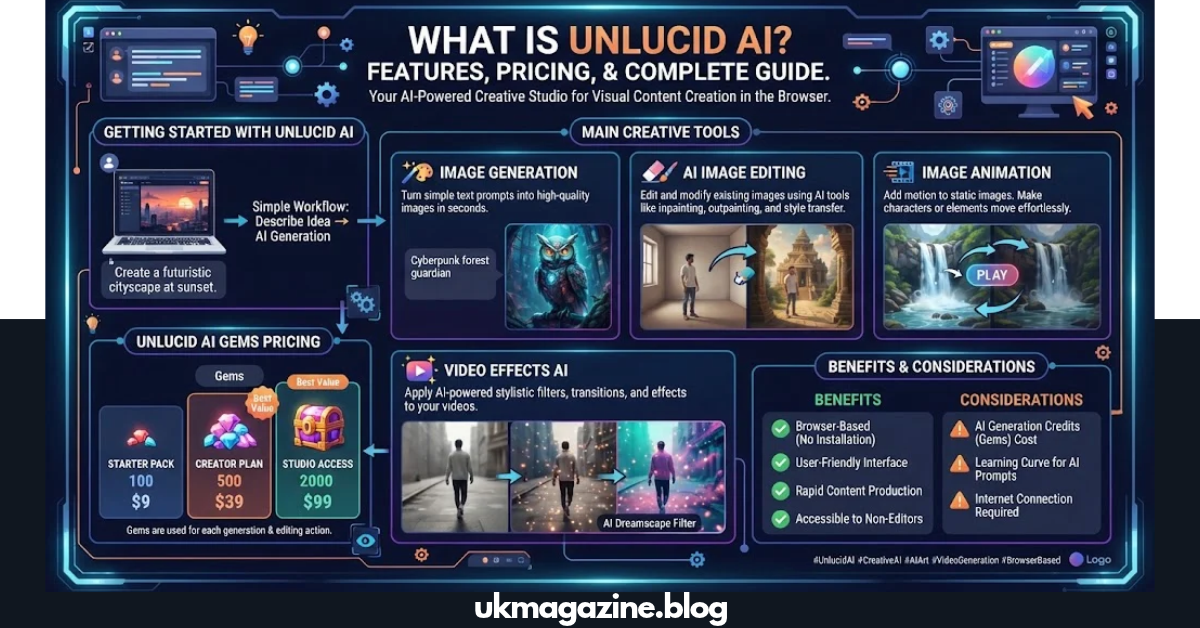
Creating images and short videos can take hours when you use traditional editing software. Unlucid AI brings image generation, image editing, animation, and video effects into one browser-based creative platform. The service is designed for people who want to turn simple ideas or existing images into visual content without advanced editing skills. This guide explains what it does, how its main tools work, what its Gems cost, and what to consider before using it.
What Is Unlucid AI?
Unlucid AI is a browser-based creative platform for generating and editing visual content. Its official website currently provides tools for creating images, editing images, animating images, and producing videos with AI.
The platform focuses on a simple workflow. Instead of learning complex editing software, users can describe an idea, upload an image, or select an effect and let the AI handle much of the production process.
According to the official site, its main creative areas include:
- Video AI
- Effects AI
- Image generation
- AI image editing
- Image animation
- Preset video effects
- AI tutorials
This makes unlucid ai useful for creators who want to experiment with visual content without installing traditional desktop software.
How Does Unlucid AI Work?
Answer: Unlucid AI works through a web browser. You select the creative tool you need, provide a prompt or image, configure the available options, and submit the generation.
For example, someone who wants to animate an existing picture can start with an image and use an animation or effect workflow. Someone creating artwork from scratch can use the image generator and describe the desired subject, style, and scene.
The basic process is:
- Open the official Unlucid AI website.
- Choose an image, editing, video, or effects tool.
- Enter a prompt or upload an image when required.
- Select the available settings.
- Start the generation.
- Review the result.
- Refine the prompt or image if necessary.
The platform’s official tutorials also show that its creative tools have received regular updates, including new effects and improvements to its video generation system.
What Can You Create With Unlucid AI?
The platform supports several types of AI-generated visual content.
| Creative Task | Unlucid AI Tool | What It Does |
| Create artwork | Image Generator | Generates images from ideas and prompts |
| Edit a picture | Edit Image | Makes changes to existing images |
| Animate an image | Video AI | Turns visual concepts or starting images into video |
| Apply motion | Effects AI | Adds preset visual effects |
| Improve an idea | Prompt-based tools | Helps translate descriptions into visual results |
| Experiment with styles | Image tools | Lets users explore different visual directions |
The biggest advantage is the ability to move between different creative tasks in one platform instead of using a separate service for every step.
Unlucid AI Image Generator
The image generator is designed for users who want to create artwork from written descriptions.
You can describe elements such as:
- Subject
- Clothing
- Location
- Lighting
- Camera angle
- Mood
- Art style
- Background
- Composition
For example, instead of writing a vague prompt such as “a beautiful city,” a more useful description could explain the location, time of day, lighting, architecture, camera perspective, and desired visual style.
Better prompts generally give the system more information to work with.
A Simple Prompt Formula
Try this structure:
Subject + action + location + style + lighting + camera view
Example:
A small golden cat sitting beside a rainy window, cozy apartment interior, soft morning light, cinematic composition, detailed 3D illustration.
The goal is not to make prompts unnecessarily long. Clear descriptions usually make it easier to communicate the visual idea.
Unlucid AI Video Generator
The video side of unlucid ai allows users to create short visual clips from prompts and, depending on the workflow, use starting images.
The official platform describes its video tools as a way to turn ideas into videos and has introduced custom prompting alongside enhanced video models.
A useful video prompt should explain movement rather than only describing the first frame.
For example, include details such as:
- What the subject does
- How the camera moves
- What happens in the background
- The speed of movement
- The mood
- Lighting changes
- Approximate scene progression
A still-image prompt might say:
A woman standing beside a lake at sunset.
A video-oriented prompt could instead describe:
A woman standing beside a calm lake while the camera slowly moves closer, gentle wind moving her hair, warm sunset light reflecting across the water.
The second prompt gives the video model more information about motion and scene behavior.
What Is Effects AI?
Effects AI is the preset-effect side of the platform.
Instead of building every video movement from a detailed prompt, users can choose from available effects designed to transform images or create short visual sequences.
The official Unlucid website currently advertises 15+ video effects and highlights examples such as Dance, Squish, Zoom, Smash, and Reveal.
This approach can be useful when you want a quick social-media-style animation rather than complete control over every part of the scene.
Effects AI vs Video AI
| Feature | Effects AI | Video AI |
| Main purpose | Apply preset effects | Create custom video concepts |
| Input | Usually an image | Prompt and/or starting image |
| Control | More preset-driven | More prompt-driven |
| Best for | Quick experiments | Custom scenes |
| Learning curve | Simple | Requires better prompting |
Unlucid AI Image Editing Tools
AI image editing can be useful when the original picture is close to what you want but needs changes.
The official Unlucid AI description says its editing tools can help remove unwanted elements, change colors, and modify parts of an image without requiring traditional editing experience.
Common editing tasks include:
- Removing unwanted objects
- Adjusting visual elements
- Changing parts of an image
- Modifying colors
- Experimenting with different appearances
- Improving an existing creative concept
This makes AI editing different from starting with a completely blank image.
Unlucid AI Pricing: How Do Gems Work?
Answer: Unlucid AI uses a Gems-based system. The official pricing page currently lists daily free Gems and paid Gem bundles.
The current official bundles are:
| Gem Package | Listed Price | Advertised Image Capacity | Advertised Edit Capacity | Advertised Video Capacity |
| 120 Gems | $8.99 | Up to 120 | Up to 60 | Up to 12 |
| 450 Gems | $29.99 | Up to 450 | Up to 225 | Up to 45 |
| 1,250 Gems | $59.99 | Up to 1,250 | Up to 625 | Up to 125 |
The official page also states that paid packages offer no-watermark output and that users can claim free Gems daily.
Actual usage can vary by tool and generation, so users should check the current interface before assuming that every generation will consume the same number of Gems.
Is Unlucid AI Free?
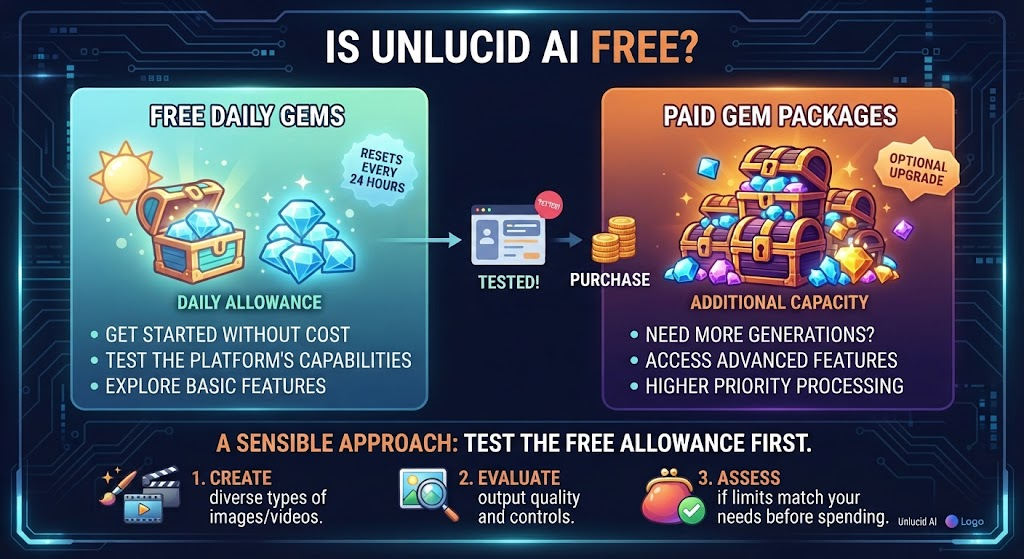
Answer: Unlucid AI offers free daily Gems, but it also provides paid Gem packages for users who need additional generation capacity.
This means you can try the service without immediately purchasing a package.
A sensible approach is to test the free allowance first. Create several different types of images or videos and see whether the output quality, controls, and generation limits match your needs before spending money.
Is Unlucid AI Easy to Use?
For basic creative tasks, the platform is designed to be accessible to people without professional video-editing experience.
The official About page specifically describes the service as requiring no technical or video-editing skills for its core workflows.
A beginner can start with a simple workflow:
- Pick one creative goal.
- Start with a short prompt.
- Generate the first result.
- Identify what looks wrong.
- Change only the weak part of the prompt.
- Generate again.
- Save the version that best matches the idea.
This approach is usually easier than changing ten prompt elements at once.
How to Write Better Unlucid AI Prompts
Good prompts are specific without becoming confusing.
Instead of:
A nice house.
Try:
A modern white house beside a green mountain, large glass windows, warm interior lights, evening sky, cinematic photography, wide-angle view.
The second prompt gives the AI more visual information.
Prompt Tips
- Describe the main subject first.
- Add the setting.
- Explain important actions.
- Mention the visual style.
- Add lighting when it matters.
- Specify the camera angle for photography-style images.
- Avoid conflicting instructions.
- Change one major element at a time when refining results.
For video, add movement and camera direction. For image editing, clearly explain what should change and what should remain untouched.
Who Can Benefit From Unlucid AI?
Unlucid AI can be useful for several types of creators.
Content Creators
Social-media creators can experiment with short animations, visual concepts, and AI-generated artwork.
Bloggers
Bloggers can use AI-generated visuals to support articles, provided they follow appropriate image rights, disclosure, and publication practices.
Designers
Designers can use AI generation during the early concept stage to explore ideas quickly.
Small Businesses
Small businesses may use AI visuals for brainstorming, promotional concepts, social posts, and internal creative work.
Beginners
People who do not know advanced Photoshop or video-editing software may find browser-based AI tools easier to start with.
However, the suitability of any AI platform depends on the specific project, required output quality, privacy needs, and commercial-use requirements.
Unlucid AI vs Traditional Editing Software
The two approaches solve different problems.
| Area | Unlucid AI | Traditional Editing Software |
| Setup | Browser-based | Often requires installation |
| Learning curve | Lower for basic tasks | Can be higher |
| Creation method | Prompts and AI tools | Manual editing |
| Speed | Fast for experiments | More manual |
| Fine control | Depends on AI tools | Usually extensive |
| Best use | Fast creative exploration | Detailed professional editing |
| Skill requirement | Beginner-friendly workflows | Often requires training |
AI tools are especially useful when speed matters. Traditional software remains valuable when you need exact control over individual layers, pixels, frames, or design elements.
What Are the Main Benefits of Unlucid AI?
Several features make unlucid ai interesting for visual creators.
1. Multiple Creative Tools
Users can create, edit, animate, and apply effects from the same platform.
2. Browser-Based Access
There is no need to install a large editing application before trying the basic workflow.
3. Simple Prompt-Based Creation
Users can describe visual ideas instead of manually drawing every element.
4. Daily Free Gems
The official platform provides a daily free Gems option, allowing users to test the service before purchasing additional capacity.
5. Regular Product Updates
Unlucid’s tutorial and update pages document multiple additions to its effects and video features during 2025 and 2026.
What Should You Check Before Using Unlucid AI?
Before using any AI creation platform for important work, check the current terms and privacy information.
Pay particular attention to:
- Ownership of generated material
- Commercial-use conditions
- Upload and storage practices
- Privacy rules
- Content restrictions
- Refund terms
- Account requirements
- Current pricing
- Generation limits
These details can change as an AI service develops.
If you are uploading personal photographs, private business material, client assets, or confidential information, read the platform’s current privacy and usage terms before uploading them.
Is Unlucid AI Good for Professional Projects?
It can be useful for concept development, experimentation, social-media visuals, and fast creative drafts, but professional users should evaluate each output before publication.
A professional workflow should include human review for:
- Faces
- Hands
- Text inside images
- Brand logos
- Product details
- Background objects
- Copyright-sensitive material
- Client requirements
- Image quality
Do not assume an AI-generated image is automatically ready for commercial publication. Your own project requirements and the platform’s current terms should determine whether an output is appropriate.
Unlucid AI for SEO and Content Creation
AI visuals can support an SEO article when they genuinely help the reader.
For example, an article about an AI video tool could use:
- A product interface screenshot
- A workflow diagram
- A before-and-after example
- A custom illustration
- A visual explanation of the creation process
The image should support the page rather than exist only to add another media element.
Google’s current guidance emphasizes helpful, reliable, people-first content and says there is no special optimization required specifically for AI Overviews. Strong fundamentals such as useful text, crawlability, internal linking, and good page experience remain important.
How to Make an Unlucid AI Article More Helpful for Google
A useful article should answer the reader’s actual questions instead of repeating the same keyword.
For an unlucid ai guide, cover practical questions such as:
- What is the tool?
- What can it create?
- Does it generate images?
- Can it make videos?
- How do Effects AI and Video AI differ?
- How do Gems work?
- Is there a free option?
- How should beginners write prompts?
- What should users check before uploading private images?
- Is it suitable for a particular project?
Google’s documentation recommends original information, complete explanations, clear authorship, trustworthy sourcing, and content that adds meaningful value instead of simply rewriting what already exists online.
Trust Signals for an Unlucid AI Review
A strong review should make it clear who wrote it, how information was collected, and which claims come directly from the platform.
For this type of article, consider adding:
- A real author byline
- Author profile or About page
- Date of publication and meaningful updates
- Links to official Unlucid pages
- Screenshots from your own testing when available
- A clear testing methodology
- Disclosure if the page contains affiliate links
- Clear separation between facts and personal observations
Google’s E-E-A-T guidance specifically encourages clear authorship and explains that experience can be demonstrated through first-hand use or other evidence of genuine knowledge.
If you personally test unlucid ai, document what you actually tested. For example, record which tools you used, how many generations you tried, what worked well, and where the results needed improvement. That creates more useful information than simply rewriting the platform’s homepage.
Frequently Asked Questions
Answer: Unlucid AI is a browser-based creative platform for generating and editing images, creating videos, animating visual content, and applying AI video effects.
Answer: It offers free daily Gems, while additional Gems can be purchased through paid packages.
Answer: The official site currently lists Gem packages at $8.99 for 120 Gems, $29.99 for 450 Gems, and $59.99 for 1,250 Gems.
Answer: Yes. Its Video AI tools are designed to create short videos from prompts and, where supported, starting images.
Answer: Yes. The platform provides AI image-editing features designed for changes such as removing unwanted elements and modifying parts of an image.
Answer: No. The official platform is designed around simple browser-based workflows so users can create and edit visual content without traditional professional editing skills.
Conclusion:
Unlucid AI brings several creative workflows into one browser-based platform. Its combination of image generation, image editing, video creation, and preset effects makes it useful for people who want to experiment with AI-powered visual content without learning a large editing application first.
The best way to judge the platform is to test the tools that match your actual project. Start with the free daily Gems, try different prompts, compare the results, and review the current pricing and usage terms before committing to paid generation.