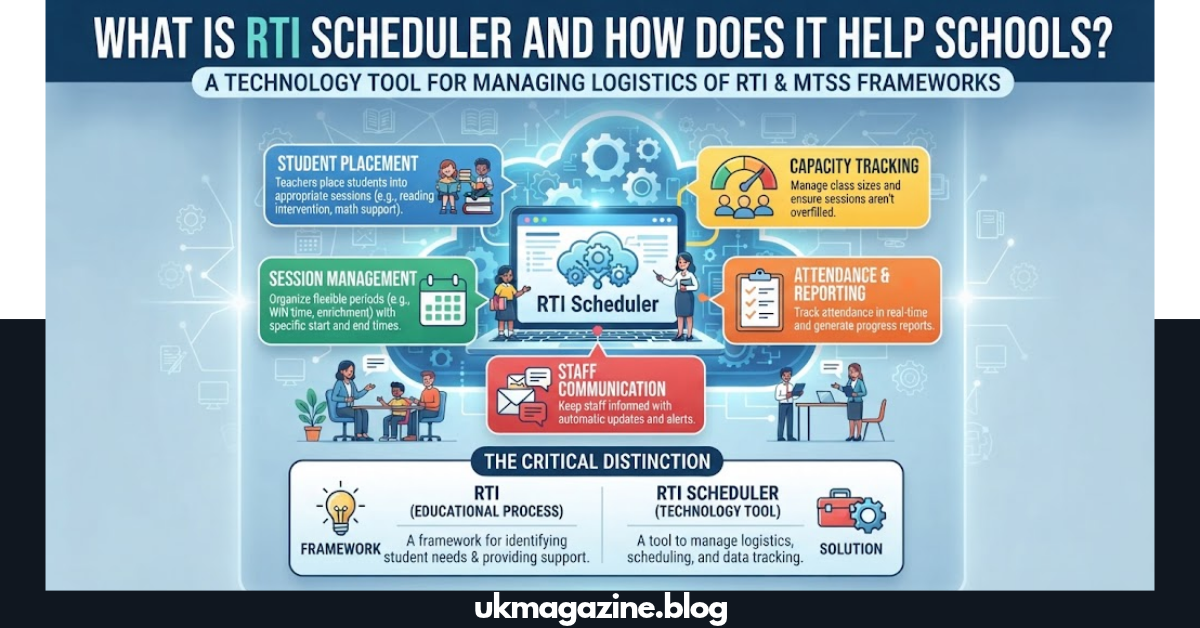
Students do not all need the same type of support at the same time. A school may run reading intervention, math support, enrichment, study hall, or WIN time within the same flexible period. RTI Scheduler is designed to organize that moving schedule so teachers can place students into appropriate sessions, manage capacity, track attendance, and keep staff informed without relying on constantly changing spreadsheets.
The important distinction is simple: RTI is an educational process, while RTI Scheduler is a technology tool that helps schools manage the logistics around that process. That difference matters when evaluating the platform, planning implementation, and measuring results.
What Is RTI Scheduler?
RTI Scheduler is a school scheduling software platform built for flexible intervention, enrichment, and student-support periods. It helps schools create sessions, assign students, manage available seats, support student self-enrollment, record attendance, communicate schedule information, and produce reports.
The platform is associated with Gammon Applications, LLC, which operates the software as a school-focused software-as-a-service product. Its subscription agreement identifies the software as an educational scheduling platform intended for school-related use.
For schools, the value is not simply putting names on a calendar. The real challenge is coordinating many students, teachers, sessions, rooms, eligibility rules, and changing academic needs during a short intervention block.
Quick definition for search and AI answers
RTI Scheduler is software that helps schools organize flexible RTI, MTSS, intervention, enrichment, and flex-period schedules by managing student assignments, sessions, capacity, attendance, communication, and reporting.
That definition also explains what the product does not do. It does not replace teacher judgment, progress monitoring, instructional planning, or the broader RTI/MTSS framework.
What Does RTI Mean in Schools?
RTI stands for Response to Intervention. It is an approach that uses student performance information, intervention, progress monitoring, and data-based decisions to provide increasingly targeted support when students need additional help. U.S. Department of Education research describes RTI implementation through multiple levels of support, progress monitoring, screening, and data-informed decision-making.
A school might organize support into different levels commonly referred to as tiers. The exact structure can differ by district or state, so schools should follow their own educational policies.
In practice, an intervention period can include:
- Reading support
- Mathematics intervention
- Writing support
- Academic recovery
- Enrichment
- Study hall
- Extension activities
- Small-group instruction
- Targeted support for specific learning needs
This is where an RTI scheduling platform can solve a practical problem: the school has already decided what support students need, but staff still need an efficient way to organize who goes where, when, and with whom.
How Does RTI Scheduler Work?
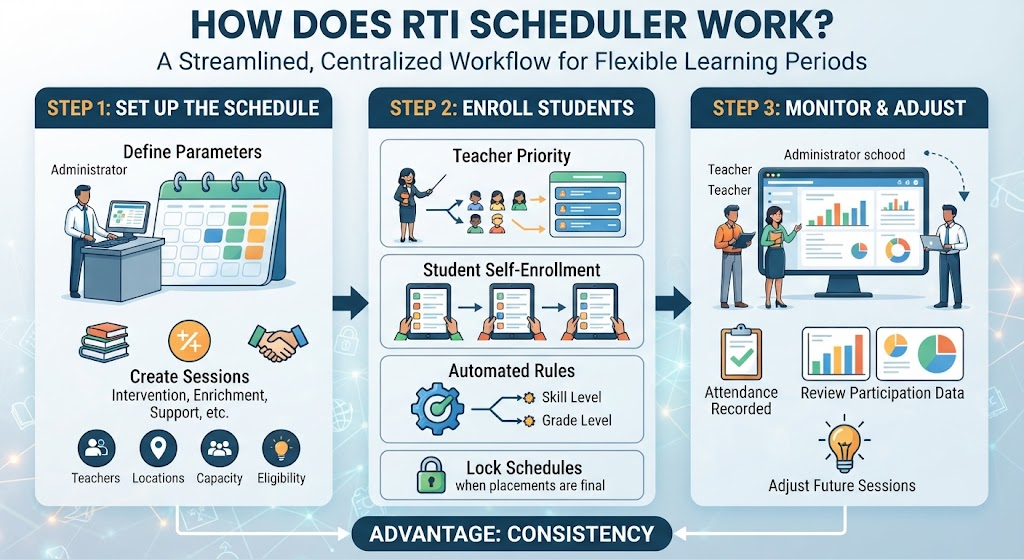
The basic workflow is straightforward.
First, an administrator or coordinator creates the schedule and defines available sessions. A session can represent an intervention, enrichment activity, support group, or another flexible-period option.
Next, the school determines how students will enter those sessions. The official product information describes several approaches, including teacher-priority enrollment, student self-enrollment, and automated enrollment based on school-defined criteria.
The final step is monitoring. Staff can use attendance information, enrollment information, and reporting tools to understand whether students actually participated in their scheduled sessions.
Typical workflow
- Import or maintain student and staff information.
- Create the intervention or flex schedule.
- Create sessions with teachers, locations, capacity, and eligibility.
- Assign students or allow controlled self-enrollment.
- Lock schedules when placements are final.
- Teachers view their student groups.
- Attendance is recorded during the session.
- Administrators review participation and scheduling data.
- Staff adjust future sessions based on school needs.
The advantage is consistency. Instead of rebuilding a schedule from scratch every time student needs change, the school can use a centralized workflow.
What Problems Does RTI Scheduler Solve?
Manual scheduling becomes difficult when the number of students and sessions grows.
A shared spreadsheet may work for a very small program. Problems usually appear when several teachers update the same file, students change sessions, seats fill, teachers become unavailable, or administrators need reliable attendance information.
RTI Scheduler is designed around these recurring problems. Its official product page highlights flexible schedules, enrollment controls, session personalization, attendance tracking, instructional-minute tracking, reporting, communication, and data integrations.
Common problems include:
Outdated rosters: A student may be moved to another support group without every staff member seeing the change.
Over-capacity sessions: A popular session can fill quickly when several students select it.
Missed students: A manual process can make it harder to identify students who still need a scheduled intervention.
Poor visibility: Teachers may not know which students should attend their session.
Weak documentation: Administrators may spend significant time collecting attendance and participation data for meetings or internal reviews.
The goal of digital intervention scheduling is therefore not simply convenience. It is better coordination.
RTI Scheduler Features Explained
The platform offers several features that directly address flexible school scheduling.
Flexible Schedule Creation
Schools can create schedules according to their own operating model rather than forcing every campus into one fixed format.
The official product description says schools can configure schedules from weekly use to multiple sessions per day. That flexibility is important because secondary schools often have different bell schedules, rotating periods, and changing intervention needs.
Session Capacity Controls
A session may have a limited number of seats. Capacity controls help staff avoid placing too many students into a group that cannot reasonably support them.
This also helps administrators see when demand is greater than available staff or space.
Teacher Priority Enrollment
Schools can allow teachers to identify students who should have priority for particular sessions.
This can be useful when the teacher has direct knowledge of a student’s classroom performance or immediate instructional needs.
Student Self-Enrollment
Schools can also choose to give students some control over available sessions.
Self-enrollment can work well for enrichment, study support, or open flex options where student choice is appropriate. It should be configured carefully when particular students require targeted intervention.
Attendance Tracking
Attendance adds an important accountability layer.
A student being assigned to an intervention is not the same as a student actually participating. Session-level attendance helps schools distinguish scheduled support from attended support.
The platform’s official materials describe attendance monitoring and exportable reporting for students and campuses.
Reporting
Reports can help schools examine patterns instead of relying on memory.
Useful questions include:
- Which students were assigned?
- Which sessions were available?
- Which students attended?
- Which groups were consistently full?
- Which sessions had unused capacity?
- How frequently did students participate?
- Which students still have no placement?
These questions turn scheduling data into operational information.
Notifications and Communication
A flexible schedule creates communication challenges. Students need to know where to go, teachers need current rosters, and administrators may need to notify staff about changes.
The official product description includes announcements and automated reminders for teachers and students.
RTI Scheduler vs. a Spreadsheet
A spreadsheet can store information. A dedicated scheduler can structure the process around that information.
| Capability | Spreadsheet | RTI Scheduler |
| Basic student list | Yes | Yes |
| Session planning | Manual | Built for scheduling |
| Seat capacity | Manual | Session capacity controls |
| Student self-enrollment | Limited/custom | Supported |
| Teacher priority | Manual | Supported |
| Attendance tracking | Manual setup | Built into workflow |
| Notifications | Separate tools | Built-in communication features |
| Reporting | Requires setup | Dedicated reporting |
| Flexible recurring schedules | Manual | Designed for frequent schedules |
| SIS/data connections | Often custom | Officially documented integrations |
| Centralized intervention workflow | Limited | Primary purpose |
The biggest difference is not the table itself. It is the amount of manual coordination behind the table.
With a spreadsheet, someone must make sure every change reaches the right people. With purpose-built scheduling software, the system can become the central place where users view and manage their assignments.
How RTI Scheduler Supports MTSS and Flex Time
RTI and MTSS (Multi-Tiered System of Supports) are closely related in many school environments, but they are not identical terms.
MTSS is a broader framework for supporting academic, behavioral, and other student needs. RTI often describes the intervention and response-to-progress process within that larger support structure.
A scheduling platform can support the operational side of either model.
For example, a school could create:
| Period Type | Example Session | Typical Goal |
| Tier 1 support | Guided practice | Strengthen core learning |
| Tier 2 intervention | Small-group math | Address a specific skill gap |
| Tier 2 reading | Reading fluency | Improve targeted literacy skills |
| Tier 3 support | Intensive instruction | Provide more individualized intervention |
| Flex | Student choice | Support academic or enrichment needs |
| WIN Time | What I Need | Match students with targeted help |
| Enrichment | Robotics or arts | Extend student learning |
| Study Hall | Supervised study | Complete or recover coursework |
The software organizes the schedule. Educators still decide which intervention is appropriate and how progress should be measured.
That distinction protects the quality of the program. Technology should reduce administrative friction, not replace educational decision-making.
Who Should Use RTI Scheduler?
The platform is most relevant to schools that run frequent intervention, flex, enrichment, or support periods.
Administrators
Administrators can oversee schedules, participation, capacity, and reporting across a school or district.
MTSS Coordinators
Coordinators can manage the logistics of student placement while keeping intervention cycles organized.
Instructional Coaches
Coaches can use scheduling information when helping teachers coordinate intervention groups.
Teachers
Teachers need clear information about which students are coming to their sessions, what capacity is available, and how attendance should be documented.
Students
Students can benefit from a clearer view of their assigned schedule and, when permitted, the ability to select appropriate open sessions.
The official RTI Scheduler site specifically positions the platform for administrators, MTSS and instructional coordinators, teachers, and students.
Does RTI Scheduler Integrate With School Systems?
Integration matters because schools already maintain student information in other systems.
RTI Scheduler’s official materials list integrations and compatibility with systems such as PowerSchool, Skyward, Infinite Campus, Synergy, Aeries, Canvas, Clever, ClassLink, and other education technologies. The product also references OneRoster API/CSV connectivity and identity options including Google and Microsoft SSO.
However, schools should verify the exact integration available to them before implementation.
Ask questions such as:
- Which student fields synchronize?
- How often does synchronization run?
- Which system is the source of truth?
- How are transferred students handled?
- What happens when a teacher leaves?
- How are user permissions managed?
- Which SSO method does the district already use?
Integration should reduce duplicate work rather than introduce another complicated data process.
Is RTI Scheduler Secure for Student Information?
Security should be a procurement requirement, not an afterthought.
The current subscription agreement states that when Gammon processes personally identifiable student information on behalf of a customer, it will process that information under applicable federal and state student privacy laws, including FERPA and COPPA where applicable. The agreement also places responsibilities on the school for appropriate authorization, access, and handling of customer content.
That does not mean a school should automatically approve a platform without review.
Before deployment, district technology and legal teams should examine:
- The current privacy policy
- The subscription agreement
- Any Data Privacy Agreement
- Data retention rules
- User access controls
- Authentication options
- Data export procedures
- Contract termination procedures
- State-specific student privacy obligations
The subscription agreement also addresses customer content and explains that customers retain rights in their own submitted content, subject to the rights needed to provide and improve the service.
RTI Scheduler and Data-Based Intervention
Good RTI implementation depends on more than creating a schedule.
The U.S. Department of Education’s RTI research emphasizes screening, progress monitoring, multiple levels of support, and data-based decision-making.
That means schools should connect scheduling decisions to instructional evidence.
For example:
Data: A student shows difficulty with a specific math skill.
Decision: The intervention team selects an appropriate support.
Schedule: The student is placed into a suitable intervention session.
Delivery: A qualified educator provides the planned instruction.
Monitoring: Progress is measured over time.
Adjustment: The team reviews the evidence and changes the support when needed.
The scheduling platform helps with the middle of this workflow. It does not replace the educational decisions before or after it.
How to Get Better Results From RTI Scheduling
Software alone does not create an effective intervention program. Implementation matters just as much.
Create clear session categories
Avoid vague session titles such as “Support 1” or “Room B.”
Use clear names such as:
- Algebra Skill Support
- Reading Fluency
- Writing Recovery
- Test Preparation
- Science Help
- Enrichment Lab
A good session name immediately tells staff and students what the time is for.
Set realistic capacity
A session with twenty seats may look efficient on a scheduling screen but may not be suitable for the instructional objective.
Capacity should reflect the teacher, room, activity, and support level.
Use student choice carefully
Self-enrollment can improve student ownership, but it should not override targeted intervention requirements.
Schools should define which sessions are open and which require staff assignment.
Review attendance regularly
Attendance should not become a box that someone checks and forgets.
Compare assigned students with actual participation. Persistent absences may reveal transportation, communication, schedule, or student-engagement issues.
Build a simple adjustment process
Student needs change.
Create a clear process for moving students between sessions, opening new groups, changing capacity, and updating staff.
A flexible schedule should be easy to adapt without becoming unpredictable.
A Practical RTI Scheduler Implementation Checklist
Before launching the system, school leaders can use the following checklist.
| Area | Key Question |
| Goals | What problem are we trying to solve? |
| Schedule | When will intervention or flex periods occur? |
| Sessions | Which support and enrichment options will be offered? |
| Capacity | How many students can each session serve? |
| Enrollment | Who assigns students? |
| Self-Enrollment | Which sessions can students choose? |
| Data | Which student information is required? |
| Integration | Which SIS or identity systems must connect? |
| Attendance | Who records participation? |
| Reporting | Which metrics will administrators review? |
| Communication | How will schedule changes reach users? |
| Privacy | Which agreements and policies must be approved? |
| Training | Which staff need hands-on instruction? |
| Review | When will the school evaluate the rollout? |
A successful implementation starts with process clarity. The software should fit the school’s intervention model rather than forcing the school to redesign its educational goals around the software.
RTI Scheduler vs. Traditional School Scheduling
Traditional school scheduling usually focuses on larger timetable structures: classes, periods, teachers, rooms, and academic courses.
An RTI scheduling system handles a different kind of problem.
The schedule may change every day or week. A student may attend math support on Tuesday, reading support on Thursday, and enrichment on Friday. Teachers may create sessions with different capacities, priorities, or eligibility rules.
That makes flexible scheduling fundamentally different from creating a normal semester timetable.
A traditional scheduling system asks:
“What class does this student take during period three?”
A flexible intervention scheduler asks:
“What support does this student need today, what sessions are available, and where should the student go during this intervention period?”
That distinction explains why spreadsheets often become difficult to manage as a flexible student-support program expands.
What Evidence Should Schools Track?
Scheduling efficiency is useful, but it should not become the only measure of success.
Schools should consider tracking a balanced set of operational and educational indicators.
Operational indicators
- Students assigned to sessions
- Students without placements
- Session capacity
- Attendance rate
- Unused seats
- Schedule changes
- Teacher participation
Student-support indicators
- Progress-monitoring results
- Intervention frequency
- Skill-specific growth
- Response to intervention
- Students requiring intensified support
- Students exiting an intervention successfully
Program-quality questions
- Are students receiving the support they actually need?
- Are intervention groups appropriate for their needs?
- Are students attending consistently?
- Are teachers able to deliver planned instruction?
- Does progress data support continuing or changing the intervention?
This approach keeps the technology connected to the real purpose: improving the delivery of student support.
RTI Scheduler Pricing and Purchasing Considerations
Schools evaluating the software should avoid relying on outdated pricing information published by third-party websites.
The current subscription agreement confirms that the service is a fee-bearing subscription, while free trials may be offered under separate trial terms. Pricing can depend on the customer order and usage limitations.
When requesting a quote, ask about:
- Number of students
- Number of campuses
- Staff accounts
- Integration requirements
- SSO
- Training
- Implementation support
- Reporting
- Additional users
- Contract length
- Renewal terms
- Data export
- Privacy agreements
The public TIPS vendor profile also identifies RTI Scheduler as a software-as-a-service offering from Gammon Applications and lists the company as an education vendor serving school systems across numerous U.S. states and territories.
A procurement decision should focus on fit, workflow, privacy, integrations, support, and measurable school needs—not simply the software license price.
What Makes RTI Scheduler Different?
The clearest differentiator is specialization.
Many calendar tools can schedule meetings. Many student information systems can store student records. Many spreadsheets can list students and rooms.
RTI Scheduler is designed around the specific logistics of frequent, flexible student intervention and enrichment scheduling. Its official materials emphasize customized schedules, enrollment controls, student targeting, attendance, reporting, communication, and education-system integrations.
That specialization can be valuable for schools where flexible periods have become too complex for manual administration.
The best question is not whether every school needs this type of software.
The better question is:
Has your intervention scheduling process become complex enough that manual coordination is taking time away from teaching and student support?
If the answer is yes, a purpose-built system deserves evaluation.
FAQs
Answer: RTI Scheduler is educational scheduling software designed to help schools manage intervention, enrichment, RTI, MTSS, and flexible student-support periods. It supports session creation, student placement, enrollment controls, attendance, communication, and reporting.
Answer: It gives teachers clearer information about their sessions and assigned students while reducing the need to manage intervention rosters through multiple manual documents. Schools can also use attendance and reporting tools to support accountability.
Answer: Yes. RTI Scheduler supports student self-enrollment when a school enables that option. Schools can decide which sessions remain open for student choice and which require staff-controlled placement.
Answer: No. RTI Scheduler is designed to work alongside school systems rather than act as a complete replacement for a Student Information System. Its documented integrations and OneRoster-related capabilities help schools connect scheduling workflows with existing student data systems.
Answer: No. RTI means Response to Intervention, an educational approach involving screening, intervention, progress monitoring, and data-based decisions. RTI Scheduler is software that helps manage the scheduling and operational side of that work.
Answer: Not necessarily. It is most relevant to schools managing frequent intervention, enrichment, flex, WIN, or student-support schedules. Schools with very simple scheduling needs may find a dedicated platform unnecessary, while larger or more complex programs may benefit from centralized automation.
Conclusion:
A good student-support program needs more than strong instructional ideas. It also needs reliable logistics.
RTI Scheduler can help schools organize the operational side of flexible intervention by bringing sessions, student assignments, enrollment rules, attendance, communication, and reporting into one workflow.
The strongest implementation treats the platform as a support system rather than a replacement for professional judgment. Schools still need sound intervention practices, progress monitoring, clear student-support goals, and regular review of results.